
Every few months, a headline resurfaces warning that connecting to airport Wi-Fi is basically handing your bank password to a stranger in a hoodie three tables away. It makes for a great scare story. It’s also mostly outdated. The public Wi-Fi risks that were genuinely terrifying in 2012 — when half the web still ran on unencrypted HTTP — look very different today, when the vast majority of sites and apps use HTTPS by default and your traffic is encrypted before it ever touches the coffee shop router.
That doesn’t mean public Wi-Fi is safe. It means the real public Wi-Fi risks have shifted, and most advice hasn’t caught up. Some of the classic warnings — a hacker silently reading your Gmail because you’re on the same network — are now genuinely rare. Other public Wi-Fi risks that get far less attention, like fake captive portals and account session theft, are common enough that you’ve probably brushed up against one without noticing.
This article ranks public Wi-Fi risks the way a security team actually should: not by how dramatic they sound, but by how often they happen in the real world, who they target, and how much damage they do when they land. If you only have time to defend against the top three, this is the order to do it in.
How This Ranking Works
Public Wi-Fi risks fall into a wide range of likelihood, from “happens constantly, to almost everyone” down to “theoretically possible, essentially never seen outside a security conference demo.” Ranking them by drama instead of frequency is exactly how a lot of security advice goes stale — people spend energy defending against the rare, cinematic attack while skipping the boring, high-frequency one that actually gets people.
Each risk below is scored on three things: how often it realistically occurs on public networks, how much technical skill it requires from an attacker, and how much damage a successful attack typically causes. The list runs from the risks you should genuinely plan around to the ones you can mostly stop worrying about.
Tier 1: Public Wi-Fi Risks That Happen Constantly
Evil Twin and Rogue Hotspots
Likelihood: Very High
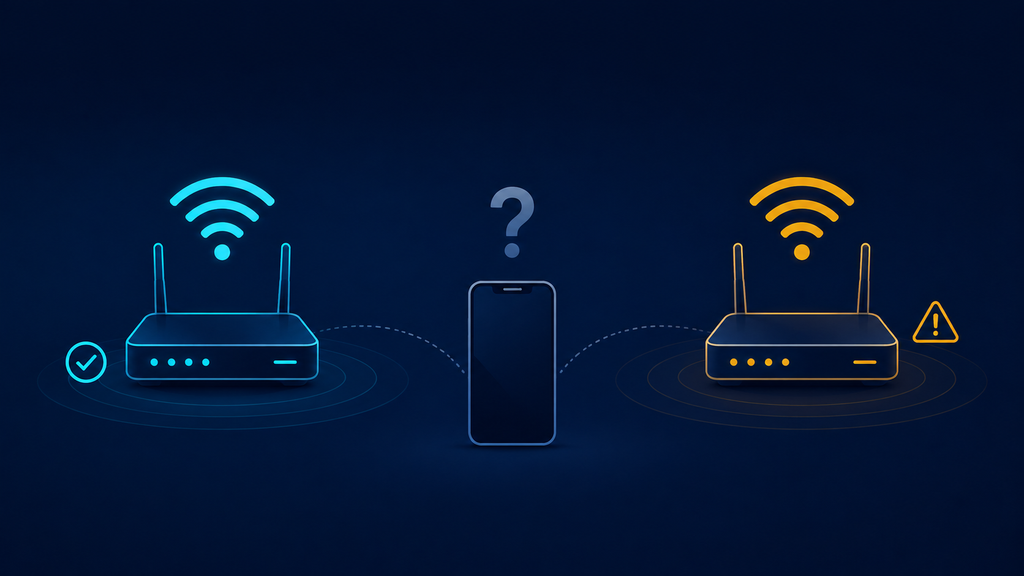
This is the single most common of all public Wi-Fi risks, and it requires almost no technical skill to pull off. An attacker sets up their own wireless access point with a name that mimics a legitimate one — “Airport_Free_WiFi” instead of “Airport-WiFi,” or an exact copy of a coffee shop’s real network name with a stronger signal so nearby devices connect to it automatically. Once you’re on the attacker’s hotspot instead of the real one, every bit of unencrypted traffic and every login attempt on a poorly secured page passes through their equipment first.
What makes evil twin attacks so persistent among public Wi-Fi risks is the tooling required: a laptop, a $20 USB Wi-Fi adapter, and free open-source software is enough to spin one up. No advanced exploit, no zero-day, no expensive equipment. Industry security research confirms this is one of the easiest attacks to execute on open hotspots, precisely because it’s so trivially reproducible with consumer-grade hardware.
Real-world pattern: Airports, hotel lobbies, and conference centers are the highest-risk locations, because travelers are primed to connect quickly to whatever network looks official and are less familiar with the venue’s actual Wi-Fi branding.
Your best defense: Confirm the exact network name with staff before connecting. Avoid networks with no password at all when a password-protected alternative exists — a password doesn’t guarantee legitimacy, but it raises the bar. Turn off auto-connect to open networks in your device settings, since this is precisely the setting evil twin attacks are built to exploit. The FTC’s public Wi-Fi guidance recommends treating any open network as inherently unverified, regardless of how official its name looks.
Fake Captive Portal Phishing
Likelihood: Very High
Almost every public Wi-Fi network routes you through a captive portal — that login or “click to agree” page before you get internet access. Attackers exploit the fact that users are conditioned to enter an email address, phone number, or even a room number and last name on these pages without a second thought. A malicious captive portal looks identical to a legitimate one but harvests credentials, or worse, prompts you to “log in with Google” or “log in with Facebook” through a convincing fake page designed purely to steal account credentials.
This ranks among the most common public Wi-Fi risks precisely because it doesn’t require intercepting encrypted traffic at all — it just asks you to hand over the information directly, and most people comply without scrutiny.
Real-world pattern: Hotel and airline lounge Wi-Fi networks are frequent targets because guests expect a login step and often enter loyalty program credentials or personal details without hesitation.
How to stay safe: Never enter a password you use elsewhere into a captive portal. If a portal asks for anything beyond a name, room number, or one-time code, treat it with suspicion. Use a dedicated, low-value email address for hotel and travel Wi-Fi sign-ups rather than your primary inbox.
Tier 2: Public Wi-Fi Risks That Happen Regularly, But Depend on Conditions
Session Hijacking Through Unsecured Cookies
Likelihood: Moderate to High
Even when a login page is encrypted, some websites and apps historically transmitted session cookies — the small tokens that keep you logged in — without proper protections. An attacker on the same network who intercepts an unprotected session cookie can impersonate you on that site without ever seeing your password. This was a massive problem a decade ago and remains a real risk today on poorly built websites, outdated apps, and internal enterprise tools that were never updated to enforce secure cookie handling across an entire session.
Among public Wi-Fi risks, this one has quietly declined as major platforms adopted HTTPS everywhere and secure cookie flags, but it hasn’t disappeared — it’s simply shifted toward smaller sites, legacy internal business tools, and apps that fall short of modern security defaults.
Real-world pattern: Business travelers connecting to internal company tools or older SaaS dashboards over public Wi-Fi are the most exposed group, since internal tools often lag behind consumer platforms in security hardening.
What actually helps: Use a VPN on public networks, which encrypts your entire connection regardless of how well an individual website handles cookies. Log out of sensitive sessions when finished rather than leaving tabs open indefinitely on shared or public networks.
Man-in-the-Middle Attacks on Weak or Legacy Encryption
Likelihood: Moderate
The classic man-in-the-middle attack — an attacker positioning themselves between you and the network to read or alter your traffic — is real, but its effectiveness has dropped sharply since HTTPS became the default across the web. Modern browsers actively warn you when a site isn’t encrypted, and most major services enforce encryption end to end. Where this attack still succeeds among current public Wi-Fi risks is against outdated apps that don’t properly validate server certificates, IoT devices with weak or absent encryption, and older mobile apps that transmit some data in plaintext.
Real-world pattern: Mobile banking or shopping apps that skip proper certificate validation are a known soft spot; security researchers have documented real cases where poorly built apps could be tricked into trusting a forged certificate presented by an attacker on the same network.
Reducing your exposure: Keep apps updated, since certificate validation flaws are exactly the kind of issue vendors patch once discovered. Watch for browser warnings about invalid or unexpected certificates and never click through them on a public network. A VPN neutralizes most of this risk category by wrapping your entire connection in its own layer of encryption before it reaches the local network at all.
Malware Distribution Through Compromised Networks
Likelihood: Moderate
Some public Wi-Fi risks involve pushing malicious software rather than intercepting data directly. An attacker controlling a network — either a rogue hotspot or a compromised legitimate one — can inject malicious code into unencrypted downloads, redirect software update requests to a malicious server, or serve a fake “update your app” prompt that actually installs malware.
Real-world pattern: This is more common on networks with weak or absent network segmentation, such as small independent cafés and budget accommodations that use consumer-grade routers, compared to larger venues with enterprise-grade network security.
The simplest safeguard: Avoid downloading or updating software while on public Wi-Fi when possible; wait for a trusted network. Keep endpoint protection active and current, since it’s your last line of defense if a malicious file does make it onto your device.
Tier 3: Public Wi-Fi Risks That Are Overstated Today
Someone “Reading Your Email” in Real Time
Likelihood: Low
This is the classic scare-story image — a hacker at the next table silently watching your Gmail load. It made sense in the pre-HTTPS era. Today, the overwhelming majority of major webmail providers, banks, and social platforms encrypt the entire session by default, meaning someone sniffing packets on the same public Wi-Fi network sees encrypted gibberish, not your inbox. This particular fear ranks lowest among public Wi-Fi risks precisely because the industry-wide shift to HTTPS solved the exact problem it describes.
Where it can still happen: Older or poorly maintained websites that still allow unencrypted connections, or misconfigured internal tools your employer built years ago and never updated.
Keep this in check: Check for the padlock icon and “https” before entering anything sensitive; treat sites that fall back to plain HTTP as a red flag regardless of network type, public or private.
Packet Sniffing to Steal Passwords in Bulk
Likelihood: Low
The idea of a hacker passively capturing everyone’s passwords just by being on the same network sounds alarming, but it requires the target traffic to be unencrypted, which is now the exception rather than the rule for anything password-related. Modern operating systems, browsers, and apps push hard toward encrypted-by-default behavior specifically because this attack used to be trivial and now mostly isn’t.
Where it can still happen: Internet-of-things devices, smart home apps, and some older desktop software still transmit credentials in the clear, making them a lingering soft target even as mainstream consumer apps have closed this gap.
Where to focus your caution: Audit which apps and devices you use over public Wi-Fi; if you’re not sure whether something encrypts its traffic, treat it as if it doesn’t and avoid entering credentials through it on an untrusted network.
Full Device Takeover Just From Connecting
Likelihood: Very Low
This is the most exaggerated of all public Wi-Fi risks: the idea that simply joining a public network can, by itself, let an attacker take over your phone or laptop. In reality, this requires the attacker to exploit a specific, often unpatched vulnerability in your device’s operating system or network stack — the kind of flaw that’s expensive to find, gets patched quickly once discovered, and is generally reserved for high-value, targeted operations rather than random cafés. It’s not impossible, but it sits far outside the threat model most people need to plan around day to day.
Where it can still happen: Realistically, only against unpatched, outdated devices, or as part of a targeted operation against a specific high-value individual — journalists, executives, or government officials — rather than opportunistic public Wi-Fi risks aimed at ordinary users.
One habit closes this gap: Keep your operating system updated. This single habit closes the door on the overwhelming majority of vulnerabilities that this kind of attack would need to exploit.
Practical Guidance: A Public Wi-Fi Risk Checklist
Rather than trying to defend against every scenario equally, focus your effort where the real public Wi-Fi risks actually concentrate.
Before You Connect
Confirm the exact network name with staff rather than guessing from the list of available networks. Disable auto-connect to open Wi-Fi networks in your device’s settings, since this single setting is what evil twin attacks are built to exploit. If a paid or password-protected network option exists alongside a free open one, prefer the protected option.
While You’re Connected
Use a reputable VPN, which remains the single most effective defense across nearly every tier of public Wi-Fi risk described above, since it encrypts your entire connection before local network traffic can be intercepted at all. Avoid entering financial or highly sensitive information unless you can confirm HTTPS is active for the entire session, not just the login page. Be skeptical of any captive portal asking for more than a name or room number.
For Organizations and Remote Teams
Require a VPN for any work conducted on public networks, and enforce this through mobile device management rather than relying on individual compliance. Make sure internal tools and legacy apps support modern HTTPS and secure cookie handling — the gap between “modern consumer app” and “ten-year-old internal dashboard” is exactly where several of the public Wi-Fi risks above still succeed. Combine public Wi-Fi policy with solid home router security, since remote employees split their time between both environments and a weak home network creates the same exposure a coffee shop hotspot does.
After You Disconnect
Log out of sensitive sessions rather than leaving them open indefinitely. If you entered any credentials on a network you later suspect was compromised, change that password from a trusted connection as soon as possible, and check whether your phone shows signs of being hacked if anything felt off during the session — unusual battery drain, unexpected pop-ups, or apps you don’t remember installing.
Common Misconceptions About Public Wi-Fi Risks
“A password-protected network is automatically safe.” A password keeps out casual eavesdroppers who don’t know it, but it does nothing to stop everyone else who does know it — including other paying customers at the same café — from potentially seeing your traffic if it isn’t independently encrypted.
“My VPN makes me completely invisible.” A VPN encrypts your traffic and hides it from the local network, which addresses most public Wi-Fi risks effectively. It does not make you anonymous online more broadly, doesn’t stop phishing pages from working exactly as designed, and doesn’t protect you if you willingly enter credentials into a fake captive portal.
“Public Wi-Fi at big airports and hotel chains is safer than a small café.” Larger venues often do run more secure network infrastructure, but they’re also higher-value, higher-traffic targets, which is exactly why evil twin and captive portal attacks concentrate there. Size doesn’t reliably predict risk either way.
“If the site has a padlock icon, I’m completely safe.” HTTPS protects the data in transit between you and that specific site, but it says nothing about whether the site itself is legitimate. A convincing phishing site can have a valid padlock too.
FAQ: Public Wi-Fi Risks
Is it ever completely safe to use public Wi-Fi? No public Wi-Fi network is completely risk-free, but the realistic public Wi-Fi risks today are far more concentrated in rogue hotspots and phishing portals than in the kind of silent, total data interception people often imagine. A VPN combined with basic caution addresses the vast majority of practical risk.
Do I need a VPN if I only browse HTTPS websites? HTTPS protects the content of that specific connection, but it doesn’t hide which sites you’re visiting, doesn’t protect apps that don’t fully enforce HTTPS, and doesn’t stop you from connecting to a rogue hotspot in the first place. A VPN adds a layer of protection HTTPS alone doesn’t cover.
Are hotel Wi-Fi networks riskier than coffee shop Wi-Fi? Both carry meaningful public Wi-Fi risks, but for different reasons. Hotels see more captive portal phishing because guests expect a login step and often enter loyalty program details without scrutiny; coffee shops see more evil twin attacks because network names are less consistently branded.
Can antivirus software protect me from public Wi-Fi risks? Antivirus software can catch malware delivered through a compromised network, but it doesn’t encrypt your traffic or prevent interception. It’s a complementary defense, not a substitute for a VPN or safe browsing habits on public networks.
How can I tell if a Wi-Fi network is a fake evil twin hotspot? There’s no foolproof visual indicator, which is exactly why this ranks among the highest public Wi-Fi risks. The most reliable method is confirming the exact network name directly with venue staff rather than trusting the name alone, since attackers deliberately choose names that look official.
Should employees avoid public Wi-Fi entirely for work tasks? Avoiding it entirely isn’t realistic for most remote and hybrid teams, but sensitive work — accessing financial systems, client data, or internal admin tools — should happen through a company-mandated VPN rather than directly over an open network.
Read Also
- Home Router Security: The Default Settings Putting You at Risk
- Signs Your Phone Has Been Hacked (And What to Do About It)
- Ransomware Warning Signs: How to Catch an Attack Before It Spreads
- End-to-End Encryption: What It Protects and What It Doesn’t
Conclusion
Most of what people fear about public Wi-Fi risks belongs to an internet that mostly doesn’t exist anymore — one where nothing was encrypted and anyone with a laptop could read your email in plain text. That specific nightmare has largely been engineered away by HTTPS becoming the default rather than the exception. But new public Wi-Fi risks filled the gap: evil twin hotspots that need no technical skill to set up, captive portals built purely to harvest a login, and legacy apps that never caught up to modern encryption standards.
The organizations and individuals who handle public Wi-Fi risks well aren’t the ones who refuse to ever connect to a coffee shop network. They’re the ones who’ve matched their defenses to what actually happens — a VPN running by default, auto-connect turned off, a healthy skepticism toward any portal asking for more than a name, and the discipline to keep apps and devices updated. Rank the threats by what’s real, defend against those first, and public Wi-Fi stops being the minefield the headlines make it out to be.